Skip to content
PowerGraph
  • Consulting Services
  • Products
    • CrossLink
    • PowerGraph Gantt Timeline Visual For Power BI
    • PowerGraph Task Board Visual For Power BI
    • PowerGraph Sankey Visual for Power BI
      • PowerGraph Sankey For Power BI User Guide
    • PowerGraph Time Intelligence
    • Nexus
    • Power BI Report Packs
      • Power BI Report Pack For OnePlan
      • Power BI Report Pack For Azure DevOps
      • Microsoft Dynamics Project Operations Report Pack for Power BI
      • Power BI Report Pack For Jira
      • Smartsheet report pack for Power BI
  • Solution Areas
    • Clinical Trial Data Visualization & Reporting Solutions
  • Resources
    • Blog
    • Webinars
      • Healthcare Strategy – Project And The Power Platform
      • Power BI for Project Online: Drillthrough, Bookmarks, and Buttons
      • PowerGraph – Shine A Light On Your Project Data with Power BI
  • Contact
CrossLink logo CrossLink for Smartsheet

Cross-sheet dependencies for Smartsheet.

See when a linked date in another Sheet moves. Accept the change, and CrossLink writes only that date.

CrossLink for SmartsheetGet it on Microsoft Marketplace
See how it works Smartsheet Help Book a demo
CrossLink for Smartsheet overview
How it works

Link Rows across Sheets.

A Giver Row's date drives a Getter Row's date in another Sheet.

Link a Giver to a Getter

Connect a Giver Row in one Sheet to a Getter Row in another. Each link starts In sync.

See every link's status.

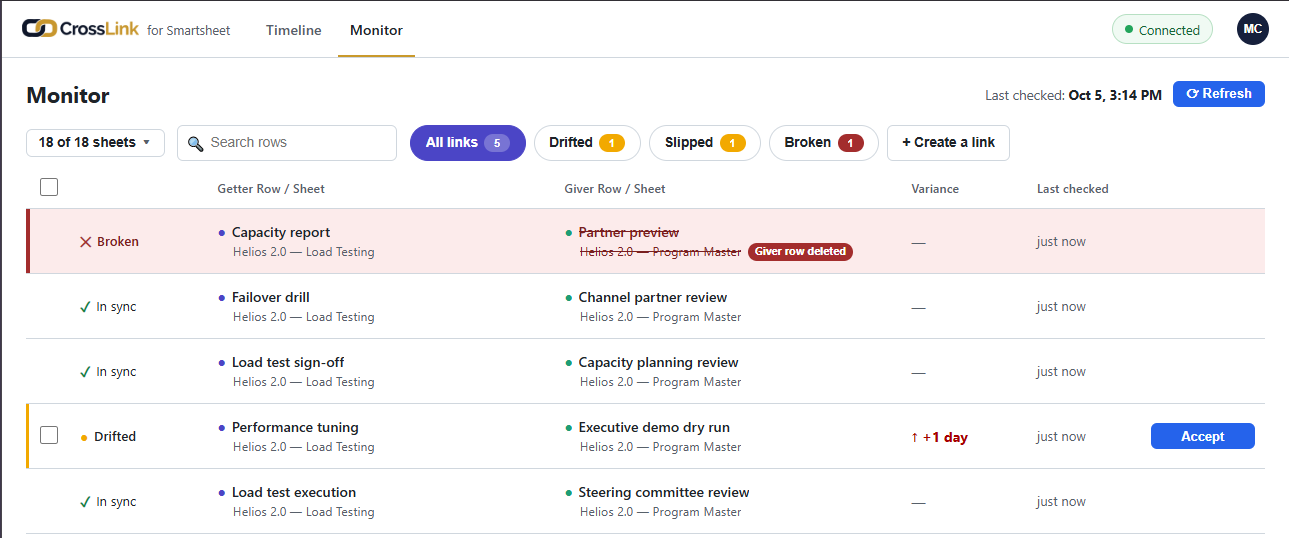
Each link is In sync, Drifted or Broken.

You decide what changes.

The product surfaces drift; it never changes dates on its own. When you accept, CrossLink writes only the date you accepted.

Your team keeps managing the work in Smartsheet, just as they do now.
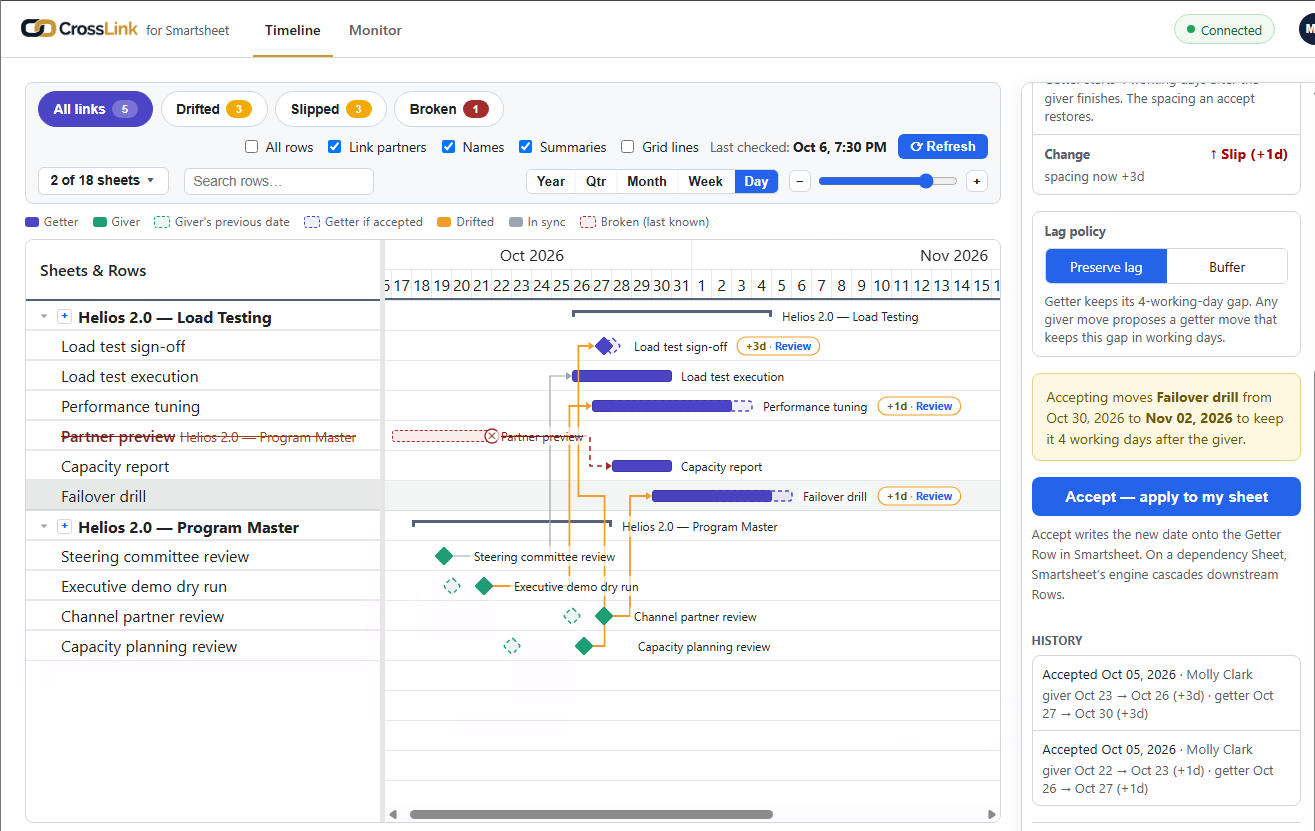
CrossLink for Smartsheet: a Drifted link flagged on the Getter Row, with the link panel open and the Accept button.
Smartsheet: Drifted Row
CrossLink for Smartsheet: the status column with one In sync, one Drifted and one Broken link.
Smartsheet: In sync, Drifted and Broken

Setup & support

Setup steps and answers to common questions are in CrossLink for Smartsheet help.

Cross-sheet dependencies for Smartsheet.

CrossLink for SmartsheetGet it on Microsoft Marketplace

Book a demo   All CrossLink editions

PowerGraph

Custom visuals, apps and consulting for Power BI and the Power Platform.

100 N Howard St., Spokane, WA 99201
206-350-1135
  • LinkedIn (opens in a new tab)
  • YouTube (opens in a new tab)

Company

  • Consulting Services
  • Products
  • Contact

Resources

  • Blog
  • Webinars

Legal

  • Privacy Policy
  • Open Source Licenses
  • Website Terms of Use

© 2026 PowerGraph. All rights reserved.